Net exercise provides a convenient method for employees to exercise their stock options without needing to pay the entire exercise price or tax immediately. In this approach, either a portion of the shares is sold, or the company withholds some shares to cover the exercise price and taxes. This option is particularly beneficial for employees who wish to exercise their options but lack the necessary funds.
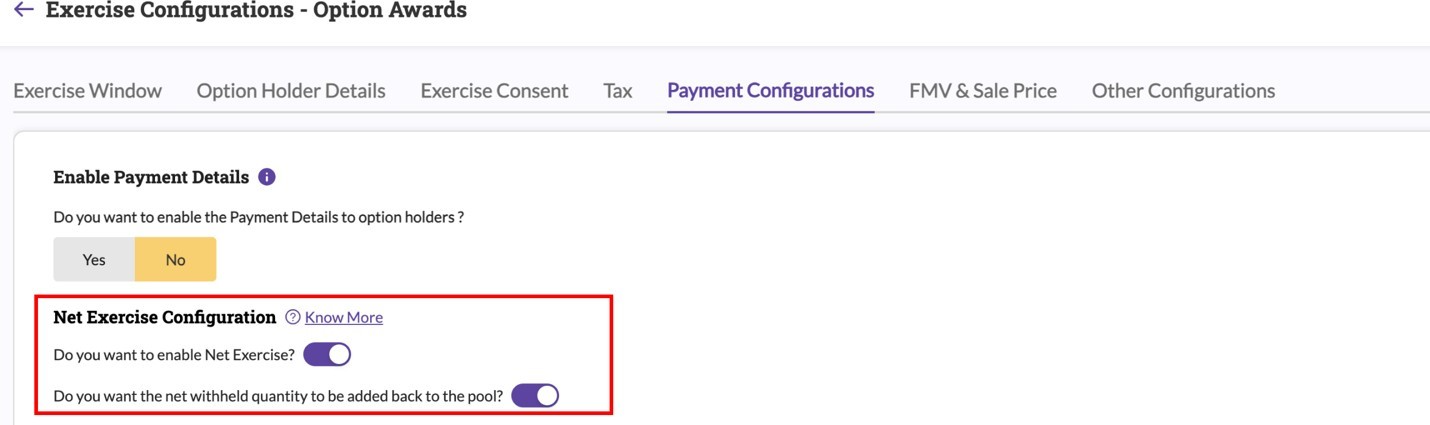
To make this option available to your employees, follow these steps: Go to Settings > Configurations > Exercise Configuration, and then access the Payment Configuration tab. Activate the Net Exercise Configuration setting. Additionally, decide if you wish the quantity of shares withheld to be reincorporated into the available pool. When Net Exercise is activated, employees can choose between using "Own Funds" or "Net Exercise" when they exercise their options.
Was this article helpful?
That’s Great!
Thank you for your feedback
Sorry! We couldn't be helpful
Thank you for your feedback
Feedback sent
We appreciate your effort and will try to fix the article