2.5 ASC 718
ASC 718 is the primary accounting standard in the U.S. that governs the accounting for share-based payment transactions, such as employee stock options and RSUs. It requires companies to recognize the fair value of equity awards as compensation expense over the vesting period. This ensures that the cost of providing equity compensation to employees is reflected on the company's financial statements, impacting profitability and earnings per share.
The Financial Reporting Module in Qapita helps companies manage, analyze and report the financial impact of their equity compensation programs.
|
ASC 718 and IFRS 2 Expense Reports in Qapita
The steps below show you how to set up, capture, and report your expenses, ensuring compliance and precise tracking every step of the way.
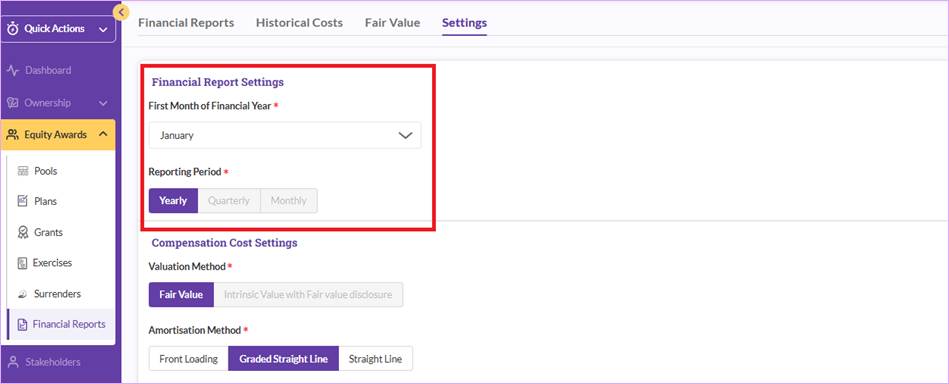
Step 1: Navigate to Equity Awards > Financial Reports > Settings. You can then set up the reporting parameters by configuring the reporting year’s details (company’s fiscal year start date).
Step 2: Choose your Amortization and True-Up Methods
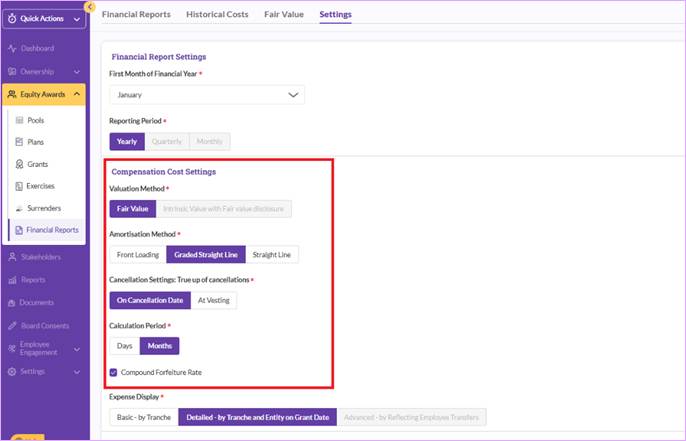
Select your preferred expense allocation method - ASC718: straight line and graded straight line methods; or IFRS2: front loading method. You are also required to set up true-up parameters for cases of cancellations or lapses.
Step 3: Retrieve Supporting Disclosure Data
You can also retrieve supporting data to assist with your disclosure reports for the relevant reporting period.
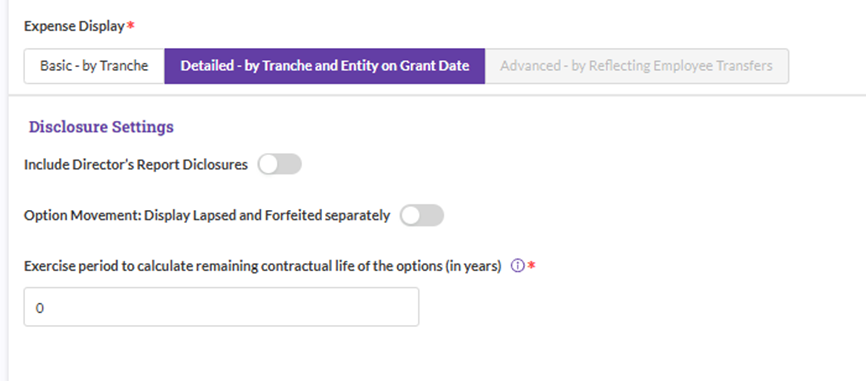
Note: If you have set up mobility data in the system, you can select this option to allocate expenses across cost centers, entities, or business units. This ensures accurate and flexible expense distribution tailored to your company’s structure.
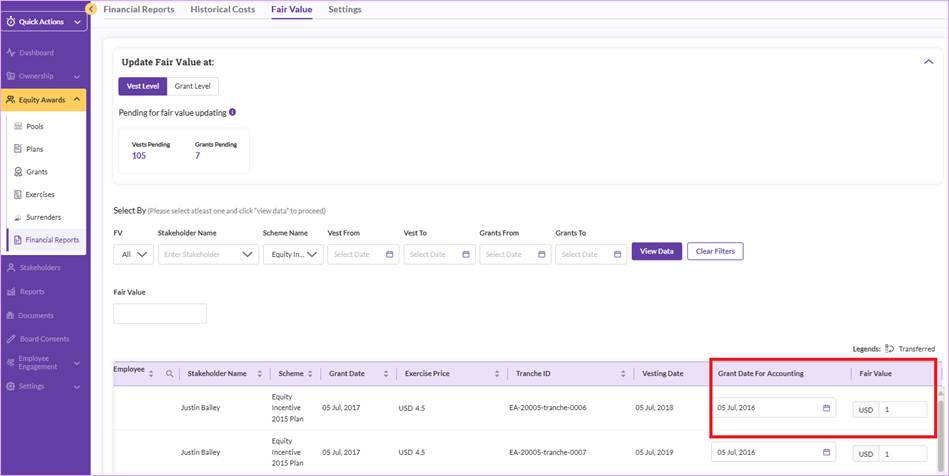
Step 4: Record Fair Values for the stock options: Input the fair value for each stock option.
You can record the fair value at the vest or grant level based on your chosen approach above. Click the grant or tranche to import the fair value based on internal calculations or third-party providers.
The “Grant Date for Accounting” is set as grant date by default. However, you can adjust it to capture the correct expense amortization start date.
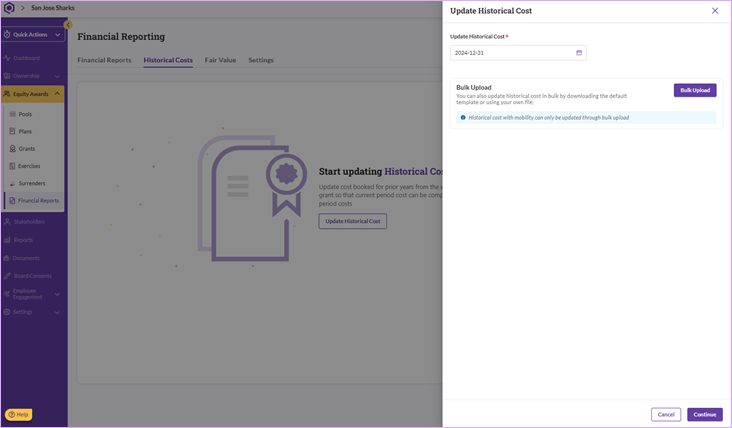
Step 5: Record Historical Life-to-Date Expense. You can import historical stock-based compensation expenses up to the current setup point, so the system maintains continuity. For example, if you plan to generate an expense report starting from 1st January 2025, you can import the historical expense up to 31st December 2024 in the system. This would ensure ongoing amortization matches your accounting.
Step 6: Generate Expense Reports
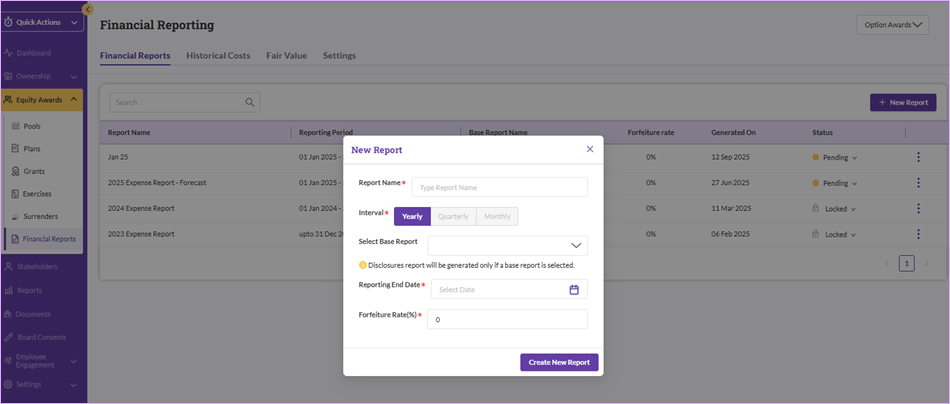
Once the setup is completed, you can generate reports for any period - monthly, quarterly, annually, or future forecasts. Set your reporting period by clicking on the desired start and end dates.
You can also set your attrition rate (forfeiture rate) when you generate the expense report.
Step 7: Review and Download Reports
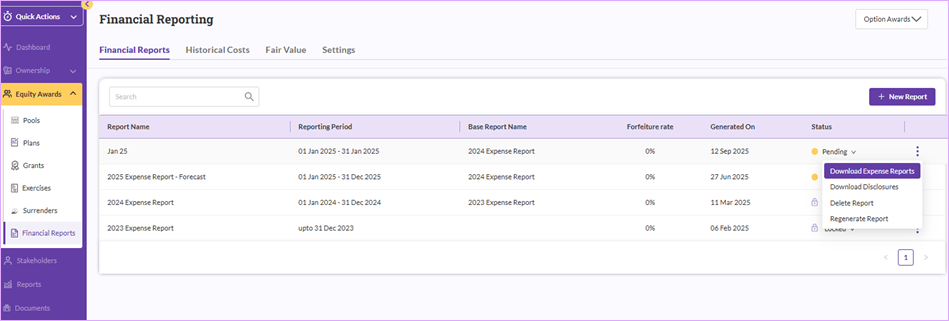
Download your expense and disclosure reports in Excel format. Click on download expense reports to generate your expense report.
Things to Note
Qapita currently supports only stock options for expense amortization and does not support RSUs or phantom shares.
Lock your expense report once you’re confident the data is accurate/finalized. This will help prevent any back-dated terminations impacting your reporting period data, so with no further changes your reporting snapshot will be locked and secured for audits or further references.
Was this article helpful?
That’s Great!
Thank you for your feedback
Sorry! We couldn't be helpful
Thank you for your feedback
Feedback sent
We appreciate your effort and will try to fix the article